

Posted Jul 4, By Maketing Namtech
Top 10 phần mềm ERP hiệu quả nhất 2025
Năm 2025, ERP trở thành lựa chọn chiến lược không chỉ cho tập đoàn mà cả SMEs nhờ khả năng c...


Menu
Posted Aug 25, By Admin

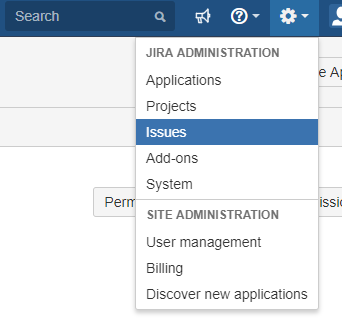
1. Go to Administration -> Issues -> Permission schemes
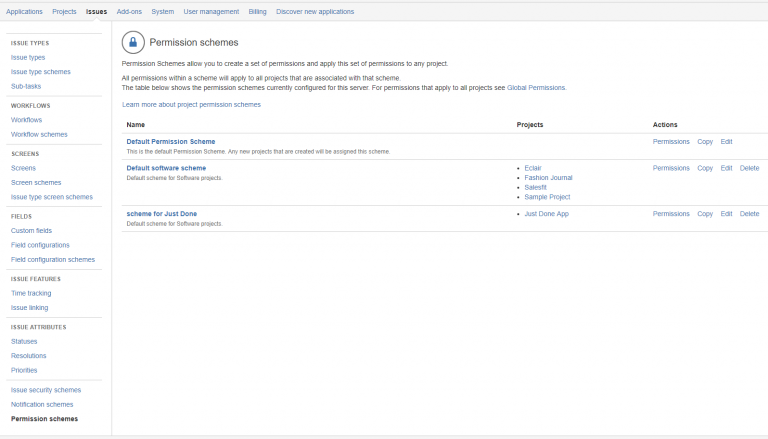
2. Click on Permissions scheme and choose scheme what you need
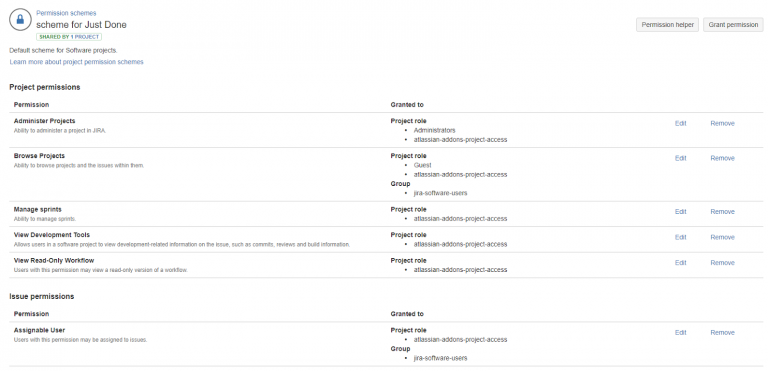
3. Click on “Grant permission” or chose from the permissions list and click “Edit”
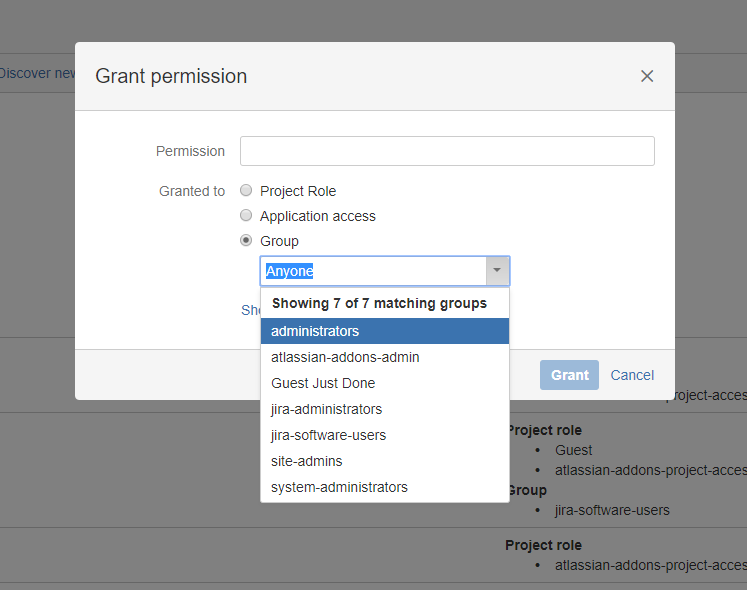
4. Granted to group or direct to user and on-field choose what permission you want to add

Posted Jul 4, By Maketing Namtech
Năm 2025, ERP trở thành lựa chọn chiến lược không chỉ cho tập đoàn mà cả SMEs nhờ khả năng c...

Posted Mar 15, By Admin
With nearly 3 billion people using Internet access devices in the world, it’s no wonder social media is considered as ...

Posted Apr 4, By Admin
Many people tend to equate Omnichannel Marketing with Multichannel marketing, using both terms interchangeably. But is t...